




Blog / Chevrolet Trax

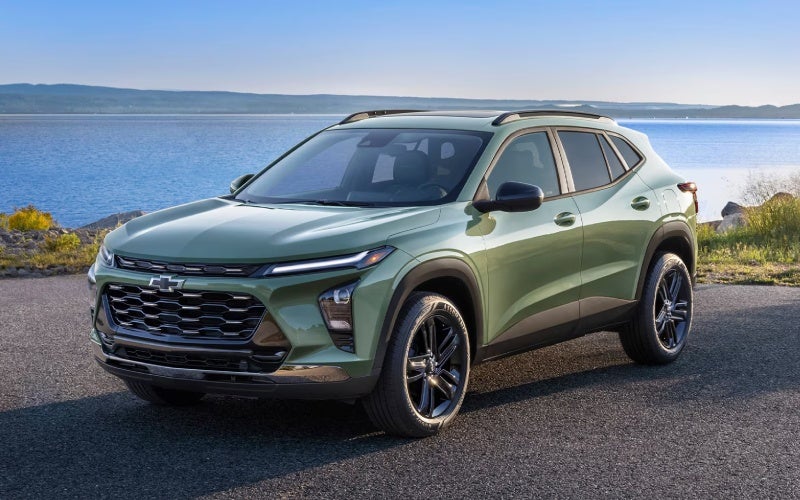
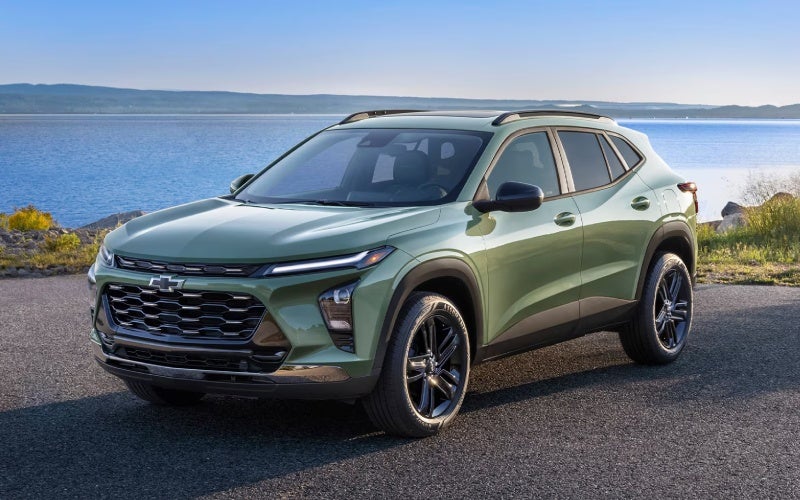
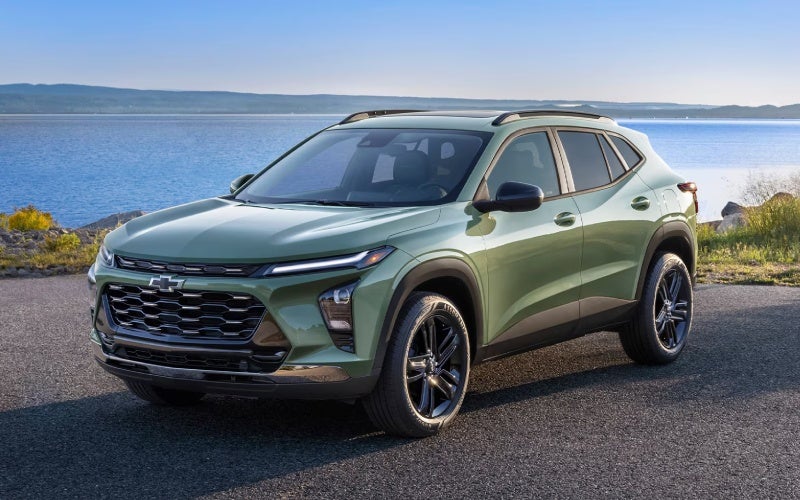
Why the 2026 Chevrolet Trax LT is the right-sized SUV for Central City, NE

Why the 2026 Chevrolet Trax LT is the right-sized SUV for Central City, NE

Grand Island Chevrolet - Why the 2026 Chevrolet Trax LT is the right-sized SUV for Central City, NE

If you’re weighing small SUVs for everyday driving around Central City, the Trax LT hits a unique balance: compact outside, effortless to park, yet thoughtfully upgraded inside where you spend your time. This trim elevates convenience and connectivity with an 11-inch diagonal color touch-screen and an 8-inch diagonal color Driver Information Center that make menus, maps, audio, and vehicle info feel natural at a glance. Add an automatic climate control system and a remote vehicle starter system, and you’re looking at an SUV that adapts smoothly to early starts, school runs, and variable schedules without extra fuss. It’s a smart pick for drivers who want more comfort than a base model, minus the complexity.

On Central City’s mix of neighborhood streets and Highway 30 stretches, the LT’s easygoing manners shine. The ECOTEC® 1.2L Turbo engine is tuned for responsive daily driving, and the cabin’s quiet character helps conversations and calls come through clearly. Standard wireless Apple CarPlay® and wireless Android Auto™ reduce cord clutter and streamline your routine, while LED headlights sharpen nighttime visibility for drives home from youth sports or late shifts. And because Chevy Safety Assist is standard, you get confidence-enhancing features like Forward Collision Alert, Automatic Emergency Braking, Front Pedestrian Braking, Lane Keep Assist with Lane Departure Warning, Following Distance Indicator, and IntelliBeam® High Beam Assist from day one.

There’s also a practical angle to the LT’s design that Central City shoppers appreciate: five comfortable seats, a 60/40 split-folding rear bench, and space flexible enough to haul weekly groceries, small furniture pickups, or rec gear for quick river stops. The 17-inch machined two-tone wheels bring a refined touch that doesn’t look out of place at a kids’ game, a work meeting, or a night out in town. What you won’t find is overcomplication. The LT’s controls are intuitive, and the larger displays reduce distraction because information is simply easier to see and use.

Here’s a clear, structured way to decide if LT is right for you:

  • Daily drivability: Compact footprint, easy parking, confident acceleration for merges and passing
  • Tech that helps: 11-inch touch-screen, 8-inch Driver Information Center, wireless Apple CarPlay® and Android Auto™
  • Comfort made simple: Automatic climate control and remote vehicle starter system reduce everyday friction
  • Safety you feel: Chevy Safety Assist with alerts and braking support for city streets and highway routes
  • Versatile space: 5-passenger layout, 60/40 split-fold, and cargo room for errands or weekend gear

Many shoppers ask whether it’s better to jump to a higher trim for “more features.” With the LT, you’re getting the upgrades most drivers actually use without adding extras you might not. The bigger displays and comfort features change how the SUV fits your life immediately — whether that’s clearer maps on unfamiliar roads, easier phone integration, or a cabin that’s already set to a comfortable temperature when you climb in. It’s a difference you’ll feel every day, not just read on a spec sheet.

As you consider test drives, think through your routine. Do you juggle school drop-off, a commute, and evening activities? The LT’s convenience features and thoughtful layout make those transitions smoother. Prefer to keep passengers connected on longer drives or while parked at practice? Add the available built-in Wi-Fi® hotspot to keep devices online. Want to keep your setup tidy? Wireless integration for Apple CarPlay® and Android Auto™ reduces the cable clutter that tends to collect in family vehicles.

From a value standpoint, LT is the trim where refinement feels tangible. The displays, climate system, and remote start aren’t just “nice-to-haves” — they remove friction in small, cumulative ways that matter on a busy schedule. And because Chevy Safety Assist is standard, you don’t need to chase optional safety packages to get those critical features.

If you’re comparing in person, our team at Grand Island Chevrolet can walk you through the LT’s interface and show how the display layout helps you move between navigation, audio, and phone with fewer taps. We’re serving Hastings, St. Paul, and Central City, and we’ll gladly set up a test drive tailored to how and where you drive most. Bring your questions — from cargo measurements to driver-assistance operation — and we’ll demonstrate each feature so you can make a confident choice.

Frequently Asked Questions:

What makes Trax LT different from LS?

LT adds an 11-inch touch-screen, an 8-inch Driver Information Center, automatic climate control, and a remote vehicle starter system for a more premium daily experience.

Does Trax LT include wireless smartphone integration?

Yes. Wireless Apple CarPlay® and wireless Android Auto™ are standard on LT, so you can map, stream, and message without plugging in.

Which safety features come standard on LT?

Chevy Safety Assist is standard and includes Forward Collision Alert, Automatic Emergency Braking, Front Pedestrian Braking, Lane Keep Assist with Lane Departure Warning, Following Distance Indicator, and IntelliBeam® High Beam Assist.

Is the LT easy to park in tighter spots?

Yes. Trax’s compact footprint and clear sightlines make it easy to maneuver into street parking or snug spaces around Central City.

Can I keep passengers connected on the go?

Absolutely. You can equip LT with a built-in Wi-Fi® hotspot, and the wireless phone integration already cuts down on cords for a cleaner setup.

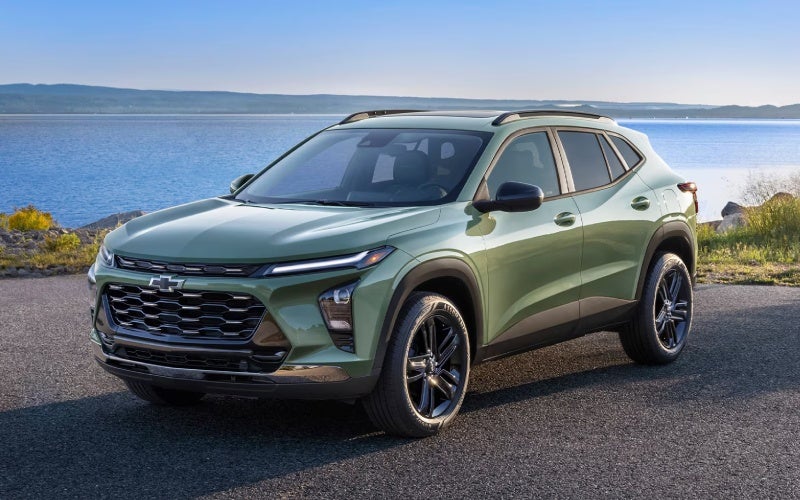
*Image may not be actual model
Request more 2026 Chevrolet Trax information

Posted in:

Related Posts

Which 2026 Chevrolet Trax trim fits daily driving around Aurora, NE best?

Which 2026 Chevrolet Trax trim fits daily driving around Aurora, NE best?

Grand Island Chevrolet - Which 2026 Chevrolet Trax trim fits daily driving around Aurora, NE best? Choosing the right 2026 Chevrolet Trax trim is easier when you match the SUV’s strengths to your daily routes around Aurora, NE. The Trax lineup keeps essentials standard—like Chevy Safety Assist and wireless Apple CarPlay® and wireless Android Auto™—then adds personality and tech as you move through LS, 1RS, LT, 2RS, and ACTIV. The key is deciding how you want your Trax to look, feel, and connect with your life. Because core features are well covered, you can prioritize the design and interface that make driving feel natural. If you move between town streets, school pickups, and Highway 34, a trim with the available 11-inch center HD touch-screen and an 8-inch diagonal color Driver Information Center can be a daily difference-maker. Below, we break down the character of each trim and highlight how to choose confidently. Understanding the Trax Trims All Trax models are built around the same fundamentals: a capable ECOTEC® 1.2L Turbo powertrain tuned for real-world drivability, standard Chevy Safety Assist, and wireless smartphone integration. From there, you pick the style and extra tech that suit your priorities. LS highlights: Everything essential stays standard—Chevy Safety Assist, wireless device integration, LED headlights, and thoughtful interior comfort. 1RS character: Sportier stance with RS badging, a unique grille, and Black bowtie emblems; inside, Red accents add a performance-inspired touch. LT sweet spot: Adds an 11-inch diagonal color touch-screen and an 8-inch diagonal color Driver Information Center, plus comfort conveniences you’ll appreciate daily. 2RS style: Ups the drama with available 19-inch machined two-tone wheels and bold Black exterior details alongside Red interior accents. ACTIV presence: Titanium chrome exterior accents, blackout wheels, and striking Yellow interior touches deliver a confident, stand-out look. If your top priority is a clean, modern interface, LT is compelling thanks to its 11-inch diagonal color touch-screen and instrument cluster upgrade. Drivers who love a sport-inspired aesthetic tend to gravitate toward 1RS or 2RS, while ACTIV is ideal if you prefer a bold, outdoorsy vibe with unique exterior flourishes. Match a Trim to Your Daily Drive Think about your typical routes, how many passengers you carry, and what you bring along most days. The Trax’s 60/40 split-folding rear seat and up to 54 cu. ft. of max cargo space make it easy to adapt, but trim choices can further enhance your experience. For tech-forward commutes: Choose LT for the larger 11-inch center HD touch-screen and 8-inch Driver Information Center to keep navigation, audio, and drive data front and center. For a sportier look and feel: 1RS adds the right visual punch, while 2RS elevates it further with available 19-inch machined two-tone wheels and more aggressive exterior details. For bold curb appeal: ACTIV stands out with Titanium chrome exterior accents, blackout wheels, and a confident stance that looks great from every angle. For budget-friendly simplicity: LS keeps essentials standard, including Chevy Safety Assist and wireless smartphone integration, so the daily basics are always covered. For family flexibility: Any trim benefits from the Trax’s smart packaging; choose based on the interface and design touches that make your drives more enjoyable. Because safety and connectivity are consistent, you can confidently pick the personality you like without giving up the features you need. If you frequently drive after dusk, remember that IntelliBeam® High Beam Assist is part of Chevy Safety Assist—standard across the lineup. Safety and Connectivity You Don’t Have to Hunt For Every 2026 Trax includes Chevy Safety Assist with Forward Collision Alert, Automatic Emergency Braking, Front Pedestrian Braking, Lane Keep Assist with Lane Departure Warning, Following Distance Indicator, and IntelliBeam® High Beam Assist. Those features aren’t reserved for top trims, which means you can shop by design and interface first. Standard wireless Apple CarPlay® and wireless Android Auto™ also streamline your daily routine, while available wireless charging and a built-in Wi-Fi® hotspot can upgrade the cabin for long drives with family or friends. That combination—confidence plus connection—makes the Trax feel consistent across Aurora’s neighborhood streets and out on open roads. Whether you’re catching a youth game or heading across the county for an errand, the Trax helps you stay focused and in touch without fuss. How to Test Drive for the Right Trim Bring your actual routine into the dealership. Pair your phone to try your navigation and playlist. Test the larger 11-inch center HD touch-screen if you’re leaning toward LT or above. Fold the rear seat to confirm loading ease for your stroller, grocery totes, or athletic gear. The right trim should make these tasks feel second nature. Confirm interface comfort: Move among apps and menus on the available 11-inch screen to see if it feels intuitive at a glance. Check cabin quietness: Drive on varying surfaces to experience how the Trax manages road noise and keeps conversation easy. Evaluate visibility: Ensure forward and rearward sightlines fit your comfort level, then assess mirror coverage. Engage driver assists: Notice how Lane Keep Assist with Lane Departure Warning and Following Distance Indicator communicate feedback. Try cargo configurations: Load a couple of real items to confirm that the cargo floor and seat folds suit your daily tasks. If you’re ready to compare trims side by side, Grand Island Chevrolet, serving Ord, Aurora, and Ravenna, can walk you through design details, tech demos, and hands-on cargo tests so you leave feeling certain about your choice. Frequently Asked Questions: Is Chevy Safety Assist standard on every 2026 Trax trim? Yes. All trims include Chevy Safety Assist with Forward Collision Alert, Automatic Emergency Braking, Front Pedestrian Braking, Lane Keep Assist with Lane Departure Warning, Following Distance Indicator, and IntelliBeam® High Beam Assist. Which Trax trim has the larger touch-screen? LT adds an 11-inch diagonal color touch-screen and an 8-inch diagonal color Driver Information Center, giving you a more expansive and modern interface. Can I get wireless charging on the Trax? Yes, wireless charging is available. It’s an excellent complement to the standard wireless Apple CarPlay® and wireless Android Auto™ compatibility. What’s the best trim for a sporty appearance? 1RS introduces RS-style cues and Red interior accents, while 2RS takes the look further with bolder exterior details and available 19-inch machined two-tone wheels. Ultimately, the best trim for daily driving around Aurora, NE depends on the design that moves you and the interface that feels most natural. With safety and smartphone integration already in place, focus on the feel, the display experience, and the details that make every trip enjoyable. Request more 2026 Chevrolet Trax information

2026 Chevrolet Trax practicality and tech for everyday drives around Ord, NE

2026 Chevrolet Trax practicality and tech for everyday drives around Ord, NE

Grand Island Chevrolet - 2026 Chevrolet Trax practicality and tech for everyday drives around Ord, NE The 2026 Chevrolet Trax has a way of making the small stuff feel effortless. That is the point of a right-sized SUV—less fuss in town, more confidence on the highway, and thoughtful features you will use constantly. Around Ord, NE, where your daily loop might include a quick hop across town for errands or a scenic stretch on Highway 11, the Trax is a comfortable companion with uncommon versatility. This blog zeroes in on two things shoppers ask us most about: how much real cargo and passenger flexibility the Trax offers, and how seamless the everyday tech feels. If you want a compact crossover with space that punches above its class and connectivity that never feels like a chore, the Trax deserves a serious look. Right-sized agility with real space On paper, a small SUV is about maneuverability. In practice, it has to do more: seat friends without feeling cramped, swallow a surprising grocery haul, and pack weekend gear without a puzzle. The 2026 Trax handles all of it well. It fits five adults comfortably, and when it is time to switch from passengers to cargo, you get up to 54 cu. ft. of room with the rear seats folded—competitive with or better than many in the segment. The 60/40 split-folding rear seat makes partial loads simple, too. You can keep a child seat installed on one side while folding the other to carry a stroller, a couple of storage bins, or that last-minute project material from the hardware store. In and around Ord, parking ease matters just as much as capacity. The Trax’s footprint slides effortlessly into downtown spaces near the square, and its visibility inspires confidence on neighborhood streets. When you are done with errands and point the nose toward the Loup River for an afternoon break, the cargo floor’s flat loading area reduces the dance of getting coolers, folding chairs, or fishing gear in and out. Technology that steps out of the way There is something elegant about standard wireless Apple CarPlay® and wireless Android Auto™—you get in, your phone connects, and your day keeps moving. That is the Trax approach. Your maps show up on the center display, your calls come through the speakers, and your playlists are ready. Add the available 11-inch center HD touch-screen and you have a generous, high-contrast canvas that is easy to read at a glance. It looks modern because it is modern, and it feels intuitive because the menus are simple and direct. The available built-in Wi-Fi® hotspot and available wireless charging extend that feeling of low-effort convenience. Passengers can stream or browse without tapping your phone’s data, and the charging pad keeps your device topped up without cords draped across the console. For a daily driver around Ord—with quick trips to the grocery store, school pick-ups, or a weekend drive down to Burwell for an event—those are the touches that make a compact SUV feel premium. Safety that supports your awareness Chevy Safety Assist is standard on every 2026 Trax. That baseline matters because it means the driver-assistance features you want are not limited to a select trim. The suite includes Forward Collision Alert and Automatic Emergency Braking, Front Pedestrian Braking, Lane Keep Assist with Lane Departure Warning, Following Distance Indicator, and IntelliBeam® High Beam Assist. The idea is not to replace good driving habits but to back them up—especially useful on two-lane highways where traffic patterns change quickly and at night on low-lit county roads. If you are test-driving the Trax locally, pay attention to how calmly it goes about its job. The alerts are clear without being intrusive, and the ride quality stays composed over patched pavement or gravel transitions you might see on rural routes outside town. It is the kind of predictability you notice most when you are tired and just want the drive home to be easy. Everyday usability tips from our team We spend a lot of time helping shoppers personalize their setup, so here are a few tips to get the most from your Trax: Pair your phone as soon as you take delivery, then set your preferred map and audio apps on the first page of the home screen. Try both wireless and USB connections—some users prefer one for daily driving and the other for longer trips. Keep a small storage bin under the cargo floor for emergency items and keep the main area clear for spontaneous errands. If you regularly swap between passengers and gear, practice a quick-fold routine for the 60/40 seat to make stop-and-go days smoother. Small changes like these can transform the way you use the space and technology, especially when your schedule varies week to week. Who the Trax fits best around Ord If your driving around Ord is a mix of neighborhood streets, short hops out to the edge of town, and periodic trips along Highway 70 or 11, the Trax hits a sweet spot. It is compact enough to park anywhere without circling the block, there is meaningful space to handle the unexpected, and the tech footprint is genuinely helpful instead of showy. It also looks the part—choose a sleek RS with red interior accents for a sporty vibe, or go with the ACTIV for bold exterior details. We think of the Trax as an everyday SUV that rewards practicality without losing personality. It is flexible, comfortable, and easy to live with, which is exactly what most of us want out of a compact crossover. Frequently Asked Questions: Is wireless Apple CarPlay and Android Auto standard on the 2026 Trax? Yes. Wireless Apple CarPlay® and wireless Android Auto™ compatibility are standard, so you can keep your phone in your pocket and still access maps, calls, messages, and music. How big is the 2026 Trax’s touch-screen? An 11-inch center HD touch-screen is available on select trims. The larger display provides a clean, high-contrast view of your apps and settings. Can the Trax handle a family’s mix of passengers and cargo? Absolutely. With seating for five and up to 54 cu. ft. of cargo space when the rear seats are folded, plus a 60/40 split to mix people and gear, it is built for flexibility. What safety features come standard? Every 2026 Trax includes Chevy Safety Assist with Forward Collision Alert and Automatic Emergency Braking, Front Pedestrian Braking, Lane Keep Assist with Lane Departure Warning, Following Distance Indicator, and IntelliBeam® High Beam Assist. If the 2026 Chevrolet Trax sounds like the right fit for your life in and around Ord, our team would love to help you compare trims and set up a drive. We are proud of how approachable this SUV is—smartly sized, easy to use, and packed with everyday capability. Grand Island Chevrolet is serving St. Paul, Central City, and Ord with a friendly, straightforward process that helps you find the right configuration quickly. Request more 2026 Chevrolet Trax information

2026 Chevrolet Trax or Mazda CX-30: Which small SUV has the better infotainment and connectivity for everyday driving around Hastings, NE?

2026 Chevrolet Trax or Mazda CX-30: Which small SUV has the better infotainment and connectivity for everyday driving around Hastings, NE?

Grand Island Chevrolet - 2026 Chevrolet Trax or Mazda CX-30: Which small SUV has the better infotainment and connectivity for everyday driving around Hastings, NE? For many shoppers, the most practical question when comparing the Trax and CX-30 is simple: which small SUV makes it easier to connect phones, manage navigation, and keep everyone’s devices powered during the weekly routine. From a pure usability standpoint, Trax takes an early lead with standard wireless Apple CarPlay® and wireless Android Auto™, so setup is as simple as stepping in and pairing. The interface is anchored by an available 11-inch center HD touch-screen, which supports fast taps and easy reading at a glance. Add available wireless charging and an available built-in Wi-Fi® hotspot, and you have an ecosystem that reduces cords, clutter, and confusion. The CX-30 counters with a cleanly designed cockpit and a 10.25-inch center display on select trims, plus available Alexa Built-in and connected features in the MyMazda App. While Mazda’s approach is elegant, it typically relies on a console-mounted controller for primary navigation of the interface, which some drivers prefer and others find less intuitive than a touch-screen. If your daily routes include school drop-offs, gym stops, and quick grocery runs, minimizing taps and swipes becomes more than a convenience—it is a daily-grind game changer. To help you evaluate both systems clearly, use the checklist below as you plan test drives and set up your phone in each SUV. Screen size and controls: Trax offers an available 11-inch touch-screen for direct taps; CX-30 provides a 10.25-inch display on select trims primarily navigated by a console knob. Phone mirroring: Trax includes standard wireless Apple CarPlay® and Android Auto™; CX-30 offers wireless integration on specific trims, with wired on others. Charging strategy: Trax makes wireless charging available and offers multiple USB ports; CX-30 provides a wireless charging pad on certain trims and USB options as well. In-vehicle connectivity: Trax makes a built-in Wi-Fi® hotspot available; CX-30 focuses on Mazda Connected Services with features in the MyMazda App. Voice features: Trax supports smartphone-native assistants through CarPlay® and Android Auto™; CX-30 adds available Alexa Built-in on select trims. Looking deeper, infotainment should also be judged by what happens when things go wrong—like when a connection drops or a device is low on battery. The Trax’s combination of wireless phone mirroring with available wireless charging reduces the chance of an accidental unplug stopping music or maps. By keeping the core touch targets large and central, the Trax also makes it easier to re-engage quickly and safely after a notification. Mazda’s interface rewards those who like tactile control with the Commander knob, and its available Bose® 12-speaker system is an audiophile’s treat on certain trims. If you are torn, ask yourself whether you want a system that behaves like a familiar smartphone or one that emphasizes minimal distractions through a dial-first approach. From a local perspective, shoppers who commute to the hospital, school, or airport will appreciate how the Trax shortens the setup process on cold mornings and keeps passengers entertained on longer drives. Bring your device: Pair your phone to both vehicles to compare the speed and stability of wireless connections. Test real tasks: Launch your map app, change playlists, and send a voice text while parked in each vehicle. Evaluate charging: Place your phone on the wireless pad and verify whether the charging indicator appears reliably. Assess readability: Glance at navigation prompts and album art on each screen to judge clarity and font size. Try multiple users: If possible, pair a second phone to see how each system prioritizes devices. Frequently Asked Questions: Does the Trax support wireless Apple CarPlay® and Android Auto™ on every trim? Yes, the Trax includes standard wireless Apple CarPlay® and wireless Android Auto™ across the lineup, so your phone connects without a cable after initial pairing. Can the CX-30 mirror my phone wirelessly? Yes, wireless Apple CarPlay® and Android Auto™ are offered on select CX-30 trims, while others use wired connections. Check the specific trim’s equipment list to confirm. How do I keep passengers online during longer drives? The Trax makes a built-in Wi-Fi® hotspot available, which can support multiple devices. The CX-30 emphasizes Mazda Connected Services and app-based features for remote access and status checks. For shoppers who want quick, cable-free mirroring with a large touch interface that feels familiar from day one, the Trax’s system is easier to learn and live with. If you prefer a minimalist look and a controller-based interface, the CX-30 has appeal—especially when combined with the available Bose® audio. Either way, the right next step is hands-on time with both systems, back to back. Grand Island Chevrolet is serving Hastings, St. Paul, and Central City with on-site pairing help, screen walkthroughs, and short tech-focused test routes so you can see how each setup fits the rhythms of your day. When you are ready, our team will help you pair your phone, customize home screens, and set map favorites to make the first morning commute feel like the hundredth. That is the kind of practical, everyday advantage that turns a good system into a great one for busy families and solo commuters alike. Request more 2026 Chevrolet Trax information